Rent Collection Software: who paid, who is late, and what to do next
Aqarflow builds the payment schedule from the contract, shows your team every morning who paid, who is late and how much is left, reminds the tenant on WhatsApp before and after the due date, and issues the receipt voucher when the payment is approved. Rent collection software for property management offices, developers and landlords, on the computer or the phone.
Free for 30 days, no credit card required. When the trial ends your account moves to the Free plan, and nothing is charged.
Why rent collection slips in most offices
The schedule lives in an Excel file, the payments in WhatsApp chats, the promises in an employee’s memory. A late installment is discovered when the owner asks, not when it happens, a partial payment gets lost between two installments, and nobody remembers when the tenant was last called.
Rent collection software turns that around: the schedule is generated from the contract once, every payment is recorded against its installment, a late installment shows by name, amount and days from day one, and your team gets the reminder before the delay becomes a problem.
What your team sees every morning
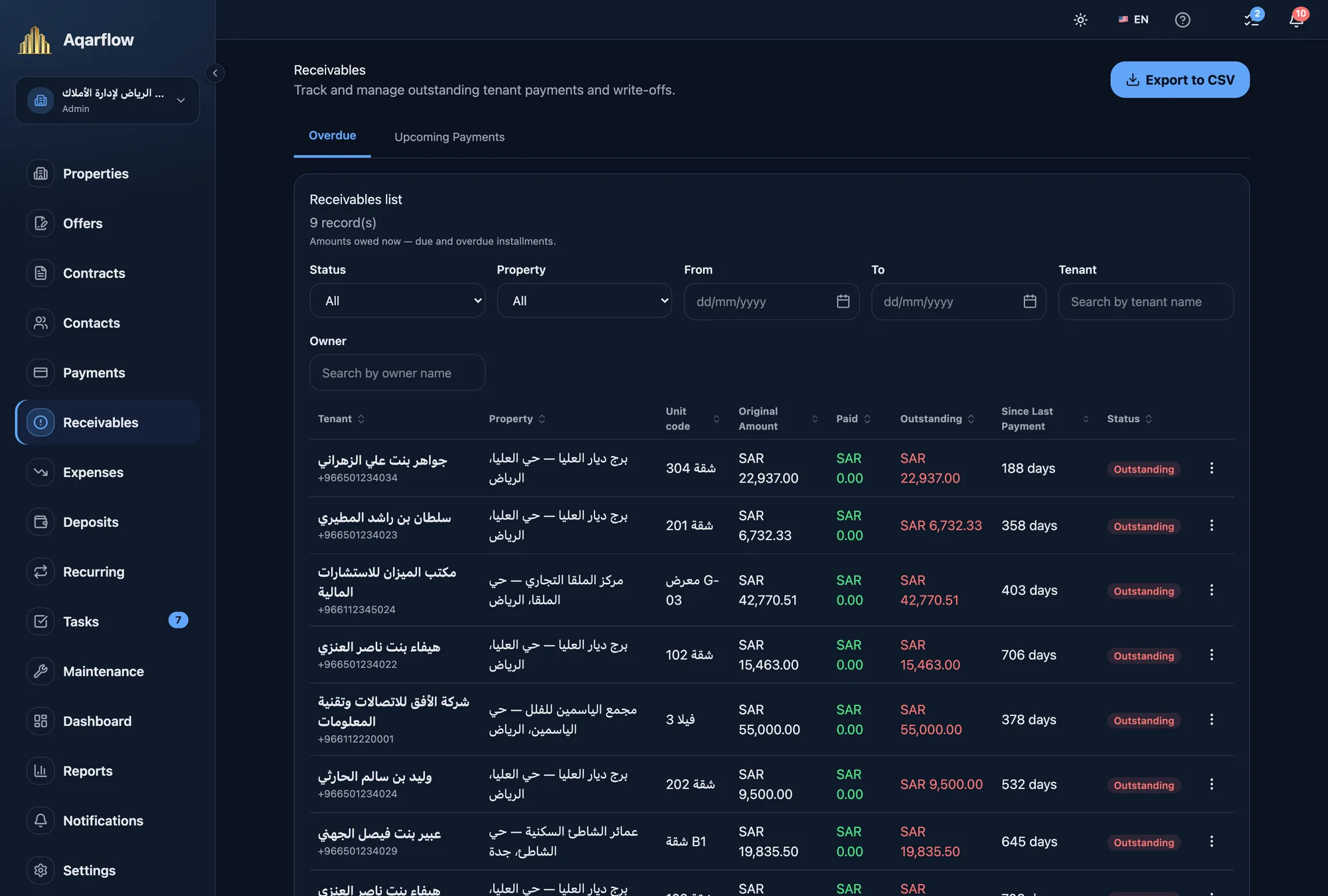
The Receivables page is where collection work happens: what is owed, by whom, and since when.
Arrears by name and amount
Every overdue installment on one row: the tenant, the property and unit, the remaining amount, and the days since the last payment. Filter by property, owner or status, and export to CSV.
The next 90 days
The Upcoming tab lists the installments scheduled for the next three months, narrowed or widened by a date range you choose, so you know the cash flow before it is due.
A dashboard that knows the collection rate
The collection rate, collected against expected for the period you pick, and the receivables overdue or due this week, on the first screen you open.
From the contract to the payment schedule
You never type a schedule. The contract generates it and the system keeps it.
A schedule generated from the contract
Monthly, quarterly, semi-annual or annual, with rent escalations in later years, and VAT split out on every installment when the contract carries it.
Ejar contract import
Upload the PDF of the contract documented on the Ejar platform. The system extracts the parties, term, rent and units, and builds the schedule for your review.
How Ejar contract import worksOne payment for a multi-unit contract
A tenant renting several units on one contract pays once. The system splits the payment across the units to the halala, and each unit’s receivable stays correct.
Existing contracts and their past payments
Enter your running contracts with what has been paid so far, so collection starts from where you are, not from zero.
Recording and approving a payment
A payment counts against the installment you chose, and is not booked until someone entitled to approve it does.
Recorded with evidence
Cash, transfer, cheque or any payment method you add, with the reference number and a picture of the receipt. Paying out of order does not hide the older installment: it stays overdue until it is paid itself.
Approval before booking
One person records, another reviews, and the receivable is marked paid after approval. Who recorded, who approved and when, all in the payment’s history.
A numbered receipt voucher
After approval, a PDF receipt voucher is issued with a sequential number that never repeats, your logo and business name, and both Hijri and Gregorian dates, by hand or automatically on every approval.
A statement per contract
A PDF financial statement listing the contract’s installments, what was paid and what remains, to hand to the tenant or the owner when they ask.
Before and after the due date: a reminder to the tenant, a ladder for your team
Set the days once in Settings and the system fires the reminders on time, to the tenant on WhatsApp and to your team in the system.
WhatsApp reminders to the tenant
A schedule of its own for the tenant: before the due date, on the day, and after a delay by the days you set, from the platform number in your office’s name, in texts WhatsApp has approved. Whoever pays on time gets no overdue message, and the tenant can stop the messages with one button.
Before the due date
A reminder to your team the number of days you choose before an installment is due, such as 7, 3 and 1, so rent is asked for before it is late.
After the due date
One rent task per contract in the Tasks inbox, not one per unit, escalating after the days you set and reaching the team’s phones as an alert.
Escalation to the general manager
If the installment stays unpaid past the period you set, the general manager is alerted automatically, and the task shows how long ago it was escalated.
A follow-up log
A call, a visit, a message or a promise to pay: recorded on the contract with the date of the next follow-up, and the system reminds its author that morning while the installment is still owed.
Tenant messages reach only the people you added on the contract, and each message is deducted from a prepaid message balance you top up by card. Calls and visits stay in your team’s hands, and the system records them and reminds them.
When the delay drags on: a discount, a reschedule, or court
Three paths, each with an approval, each on the record.
A negotiated discount
A discount on one installment, approved by whoever you give the permission to. The installment shows as discounted wherever it appears, and the contract total stays as it is in the Ejar contract.
A reschedule with approval
Split, merge or re-time the unpaid installments inside an approval flow. Nothing in the schedule changes until the final approval.
A documented court order
The system flags the installment that has reached the eligibility period under the Ejar policy, and you record the filing, the ruling and what came back through the court. Chasing stops on that installment; the accounting does not.
Built for property management offices and their teams
Amounts only for those with the permission
The accountant sees receivables and payments, the maintenance supervisor does not see rent, and the owner sees only their own properties. Permissions are per property, and a withheld amount never shows as a number.
Collection from the phone
The iOS and Android app shows receivables, records payments with their evidence, receives overdue alerts and issues the receipt voucher. Not a companion app: it runs the portfolio on its own.
Every action on the record
A write-off, a deferral, a discount or a restored write-off: each with a reason, a name and a date, there to go back to when the office is asked.
Frequently asked questions about rent collection in Aqarflow
Start with a clean payment schedule
Import your first contract from Ejar or add it by hand, and see the receivables in minutes.
Free for 30 days, no credit card required. When the trial ends your account moves to the Free plan, and nothing is charged.